
Table of Contents
If you’ve ever forgotten a password, reused one you shouldn’t have (don’t lie), or waited anxiously for an OTP that never arrived, then this article is for you.
Passkeys are not another authentication feature. They are a fundamental shift in how identity works on the internet.
By the end of this article:
- You will know why passwords are broken
You will deeply understand what passkeys are
You will understand WebAuthn, FIDO2, public-key cryptography intuitively
You will know how passkeys actually work under the hood
You will implement passkey authentication step by step
This is designed to be a one‑stop, no‑regrets, never‑Google‑again guide.
The Problem: The "Shared Secret" Paradox
Imagine you’re a thief trying to rob a house today. You don’t need to break a lock or smash a window. All you need to do is trick the owner into shouting their secret passcode through a megaphone. Once you hear it, the house is yours.
That is exactly how passwords work on the modern internet.
A password is a shared secret. You know it, the website knows it, and the moment an attacker gets it, through phishing, malware, or a data breach, they know it too. And once a password is known, it can be copied, reused, and tried everywhere.
Passwords fail because they are human-dependent. We reuse them, we make them “P@ssw0rd123,” and we fall for phishing sites that look exactly like our bank. Even if you are perfect, a database leak at a company you use exposes you everywhere.
The Solution: The Passkeys
Passkeys change the game from “something you know” to “something you have.” Built on the FIDO2 and WebAuthn standards, a passkey is not a string of text. It is a cryptographic key pair:
- The Private Key (The “Invisible Guard”): This lives inside your phone’s high-security vault. It never leaves your device. You can’t see it, you can’t write it down, and you can’t accidentally give it to a scammer.
- The Public Key (The “Digital Lock”): You give this to the website. Think of it like a padlock that only your specific phone can open. If a hacker steals this from a database, they’ve gained nothing. A thousand padlocks are useless without the one physical key that fits them.
Why Scammers Hate Passkeys: With passwords, you can be tricked into typing your secret on a fake site (Faceboook.co). With passkeys, your device is smarter than you. It checks the website’s “ID card” (it’s domain). If the URL is even one letter off, your phone simply says, “I don’t recognize this place,” and refuses to show the key. No login, no theft.
From Biometrics to Bytes: The Passkey Workflow
Imagine you are a King sending a message to a General. The General sends a messenger to your castle with a blank scroll that has a unique, random pattern watermarked on it. You take your unique Signet Ring (the Private Key) and press it into hot wax on that specific scroll. You never gave the messenger your ring! You only gave them the impression it made on that one specific scroll. The General has a Clay Mold (the Public Key) that perfectly fits your ring. He presses the mold onto the wax seal. If it’s a perfect fit, he knows for 100% certainty that the King sent it. That’s exactly, how passkeys work.
WebAuthn in Action
Now, let’s look at what is actually happening between your browser and the server:
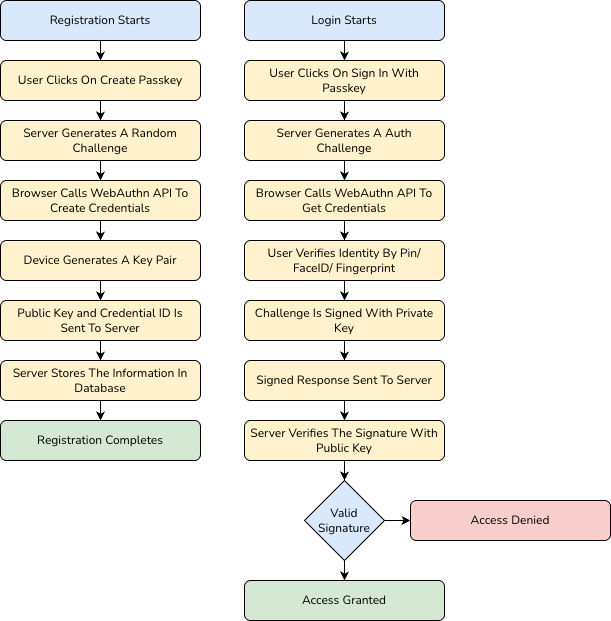
- The Challenge (Server → Browser) When you initiate a login, the server generates a “Challenge”, a cryptographically strong, random string of bytes. This challenge is sent to your browser via the WebAuthn API. This ensures that every login attempt is unique and prevents “replay attacks” where a hacker tries to reuse an old login session.
- The Assertion (Browser → Authenticator) Your browser passes this challenge to your device’s Authenticator (like the Secure Enclave on an iPhone or a TPM chip on Windows). The device won’t do anything until you prove you are there. It triggers a “User Presence” check, usually a biometric scan (FaceID/Fingerprint) or a hardware button press.
- The Signing (The Private Key) Once you’ve authenticated locally, the device uses the Private Key stored in its secure hardware to “sign” the challenge. This creates a digital signature. The Private Key is never exposed to the browser, the website, or even the operating system. It stays locked in the hardware chip.
- Verification (Browser → Server) The browser sends the signed challenge (the Assertion) back to the server. The server retrieves the Public Key it stored during your registration. Using standard cryptographic algorithms (like RSASSA-PSS or ECDSA), the server verifies that the signature was indeed created by the corresponding Private Key.
- Access Granted If the signature is valid, the server is mathematically certain that the person logging in possesses the physical device and has passed the biometric check. The server then issues a session cookie or JWT, and you are logged in.
Deep Dive: FIDO2, WebAuthn, and the Math of Trust
- Public-Key Cryptography (The Math): Passkeys use Asymmetric Cryptography. Unlike passwords where you and the server share the same secret. You can encrypt something with one, but only the other can decrypt/verify it.
- FIDO2 & WebAuthn (The Language): To ensure your iPhone can talk to a Windows laptop or a YubiKey, we need a universal language.
- WebAuthn: The browser API that lets websites talk to your device.
- FIDO2: The global protocol that ensures the “handshake” is secure.
- Platform Authenticators (The Vault): Your private keys live in the Secure Enclave or TPM (Trusted Platform Module). This is a dedicated chip physically separated from your phone’s main processor. Even if your phone has a virus, the virus cannot “reach inside” this chip to steal your keys.
In 2024, 1Password states that over 4 million passkeys are now saved in the 1Password password manager application, with about 2.1 million passkey authentications requested per month.
Putting it into Practice: A Node.js Implementation
Want to see how this looks in a real application? I’ve built a Node.js Passkey Demo that walks you through the implementation of WebAuthn. You can check out the repository here:
👉 Passkey Demo – NodeJS on GitHub – shekhar316
In the repo, you’ll see how to handle the navigator.credentials.create and navigator.credentials.get calls in the browser, and how to verify the cryptographic signatures on the server.
Conclusion
The “Shared Secret” era is dying, and honestly, we should be happy to see it go. Passkeys make the internet faster, easier, and infinitely more secure. You don’t have to remember anything, you just have to be you.
The next time a website asks if you want to set up a passkey, say yes. You’re not just enabling a feature, you’re upgrading your digital life to a vault that no megaphone-wielding thief can crack.